

The best AI agents are not necessarily the tools with the longest feature lists. The right choice is the agent that can complete a specific business task reliably, connect to the systems where your data lives, and stop or escalate when human judgment is required.
For buyers, that changes the evaluation process. Instead of asking which platform looks most advanced, compare how each option handles your actual workflows, permissions, integrations, approvals, exceptions, and operating costs.
Key Takeaways
- Start with one measurable business task, then shortlist agents that can complete that workflow end to end.
- Evaluate integrations, permissions, human approvals, monitoring, and failure handling before comparing headline AI capabilities.
- Test total operating cost and maintenance at realistic usage levels, not only the entry price or demo experience.
What Makes an AI Agent Different From a Chatbot or Basic Automation?
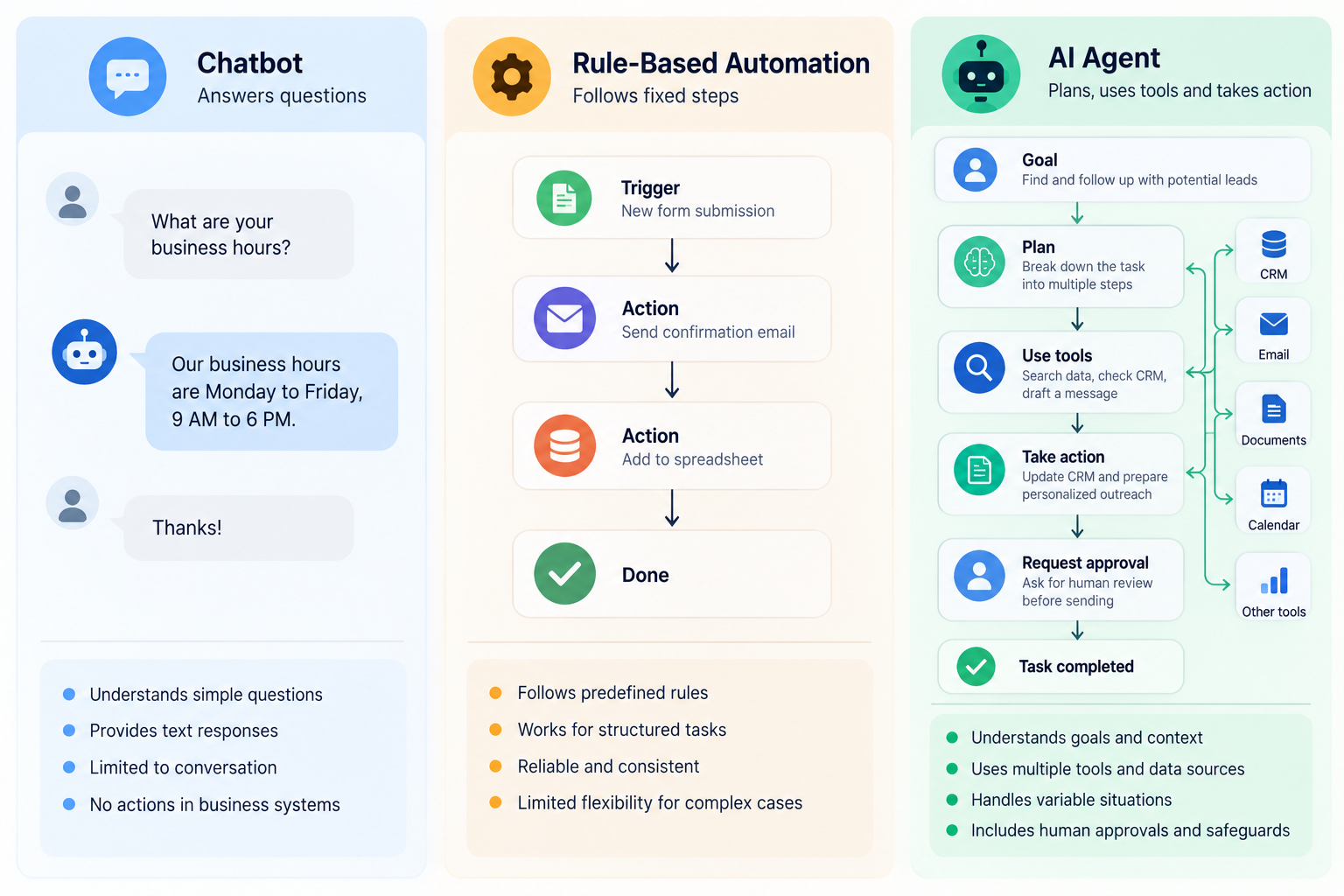
An AI agent is software that can interpret a goal, decide what steps are needed, use tools or data, and take actions toward completing the task. A chatbot may only answer questions, while traditional automation usually follows predetermined rules such as "when X happens, do Y."
A useful business agent sits between those models. It can reason through variable situations, but it still needs boundaries. For example, a sales agent might research a lead, check CRM history, draft a personalized follow-up, update a record, and ask for approval before sending the message.
That is why the phrase AI agents for business covers very different products. Some are general-purpose work agents. Others are agent builders, CRM-native agents, support agents, developer platforms, or enterprise orchestration systems.
Which AI Agents Are Worth Shortlisting for Business Tasks?
A practical shortlist should reflect where your work happens and how much control you need.
ChatGPT Work and Workspace Agents for research and knowledge work
OpenAI now positions ChatGPT Work for longer, multi-step tasks that can research, analyze, work across connected apps and files, and produce finished deliverables. Workspace Agents are designed for repeatable workflows that can use connected tools, run on schedules, and be shared across Business and Enterprise workspaces.
This makes the OpenAI ecosystem relevant when the job involves research, synthesis, document creation, recurring knowledge work, or tasks that cross several connected sources.
Microsoft Copilot Studio for Microsoft-centered workflows
Copilot Studio is built for creating agents and workflows inside the Microsoft ecosystem. Microsoft describes it as a low-code environment for building custom agents, and its 2026 updates expanded support for more complex multi-step work, governance, and connected tools.
It is a natural shortlist candidate when Microsoft 365, Power Platform, Azure, Teams, or related identity and governance systems already sit at the center of operations.
Salesforce Agentforce for CRM-centered sales and service processes
Agentforce is tightly connected to Salesforce data and development tooling. Salesforce supports agent building, testing, APIs, SDKs, and programmable controls inside the broader Salesforce environment.
That makes it relevant when the agent's main job depends on Salesforce records, sales processes, customer service data, or existing Salesforce permissions.
Google Vertex AI Agent Builder for developer-led enterprise agents
Vertex AI Agent Builder is Google's suite for building, scaling, and governing AI agents in production. It is aimed more at developer and enterprise implementation than at a simple plug-and-play assistant.
It deserves consideration when your team wants custom agent architecture, Google Cloud integration, production deployment controls, and flexibility over how the agent is engineered.
Lindy for cross-tool assistants and recurring team tasks
Lindy focuses on agents that work across business applications and can be instructed in natural language. Its current product materials emphasize integrations, recurring routines, approvals, team sources, audit visibility, and access controls.
This can fit smaller or mid-sized teams that want cross-tool assistants without building a full custom agent platform from scratch.
AI by Zapier for agentic steps inside broader automations
Zapier is moving its standalone Agents product into AI by Zapier, where AI reasoning and autonomous actions can run inside normal Zap workflows alongside triggers, filters, branching, and deterministic automation steps.
That is important for buyers evaluating old "Zapier Agents" comparisons. The current direction is stronger integration between AI reasoning and the larger automation workflow rather than a separate agent product.
UiPath for complex enterprise process orchestration
UiPath combines AI agents with robots, people, and existing enterprise systems. Its current orchestration positioning focuses on long-running processes, exception handling, governance, auditability, and coordination across different kinds of workers.
This is more relevant to enterprises with RPA, legacy systems, complex operations, or governance requirements than to a small team looking for a simple AI assistant.
How to Compare the Best AI Agents for Business
The most useful buying framework starts with your process, not the vendor demo.
1. Define the exact task and success measure
Write the workflow in plain language. What starts it? What data must the agent read? What decisions does it make? What actions can it take? Where should a person approve or intervene?
Then define one or two success measures. These could include response time, percentage of cases completed without rework, hours of manual processing removed, or fewer missed follow-ups.
Without a measurable task, almost every demo looks impressive and almost every pilot becomes difficult to judge.
2. Check whether the agent can reach the systems that matter
Integration count is less useful than integration depth. An agent that technically connects to your CRM but cannot read custom fields, respect permissions, or update the right objects may not be operationally useful.
Map every system in the workflow, including CRM, email, ticketing, documents, spreadsheets, databases, internal tools, and approval channels. Confirm exactly what the agent can read and what it can change.
This is especially important for AI agents for business operations, because operational workflows often fail at handoffs between systems rather than at the reasoning step itself.

3. Evaluate permissions, approvals, and rollback controls
A business agent should not receive unrestricted access just because it can complete a task faster. Ask whether permissions can be limited by user, role, data source, action type, or environment.
For higher-risk actions, look for approval steps before sending messages, changing customer records, issuing refunds, publishing content, or modifying important data.
Also ask a simple operational question: if the agent behaves incorrectly, can your team stop it quickly and understand what it already changed?
4. Test reliability with real exceptions, not ideal examples
A polished demo usually shows the happy path. Your evaluation should test messy inputs, missing fields, conflicting instructions, unavailable systems, duplicate records, unusual customer requests, and ambiguous cases.
Track how often the agent completes the task correctly, how often it needs human help, and whether failures are visible. A slightly less autonomous agent with predictable escalation can be more useful than a highly autonomous system that fails silently.
5. Compare pricing at realistic volume
AI agent pricing can be based on seats, credits, tasks, conversations, model usage, automation steps, infrastructure, or a combination of those factors.
Model your expected monthly volume, then model a busier month. Include the cost of connected platforms, premium integrations, API usage, implementation, monitoring, and maintenance.
The cheapest pilot is not automatically the lowest-cost production option. This is especially important when comparing a packaged platform with custom AI agents for business built around your own systems.
6. Decide who will own the agent after launch
Every production agent needs an owner. Someone must review failures, update instructions, maintain integrations, adjust permissions, test changes, and decide when the workflow has changed enough to require a rebuild.
Before buying, ask whether that owner will be an operations manager, platform admin, developer, automation specialist, or outside partner. A platform can be powerful and still be the wrong fit if your team cannot realistically maintain it.
Should You Buy a Platform or Build a Custom AI Agent?
Buy an existing platform when the workflow is common, the required integrations already exist, and your team values faster deployment over custom control. Sales follow-up, support triage, research, scheduling, and routine cross-app operations often fit this path.
Consider custom AI agent development when the workflow depends on proprietary systems, unusual business rules, complex approvals, specialized data, or several systems that packaged tools cannot connect cleanly.
A custom build can also make sense when the agent itself will become part of your product or a strategically important internal process. The trade-off is that you now own more testing, monitoring, security, maintenance, and integration work.
A hybrid approach often works well: use established platforms for standard capabilities, then add custom logic only where your process requires it.
A Simple Buying Checklist Before You Commit
Before signing a contract or expanding a pilot, confirm that you can answer these questions clearly:
- What exact business task will the agent own?
- Which systems and data sources must it access?
- Which actions can it take without approval?
- What happens when data is missing or the agent is uncertain?
- Can every important action be logged and reviewed?
- What does the workflow cost at normal and peak usage?
- Who maintains prompts, tools, integrations, and permissions?
- What metric determines whether the deployment is worth continuing?
This checklist is more useful than choosing from a generic list of top AI agent platforms because it forces the product to prove that it fits your operating environment.
FAQs
What are the best AI agents for small business teams?
The best fit depends on the task and software stack. Small teams often benefit from low-code or no-code agents that connect to existing email, CRM, calendar, support, and document tools without requiring a dedicated engineering team.
How should I evaluate the best AI agent platform before buying?
Test one real workflow. Evaluate integration depth, permissions, approvals, reliability, exception handling, monitoring, maintenance requirements, and total cost at realistic usage. Do not rely only on feature lists or a controlled demo.
Are AI agents for business process automation fully autonomous?
They can be highly autonomous, but full autonomy is not always desirable. Important business workflows often benefit from explicit limits, approval gates, human escalation, audit logs, and deterministic automation for steps that should not depend on AI judgment.
Choose the Workflow Before You Choose the Agent
The best AI agents are the ones that fit a defined job, connect to the right data, operate inside clear permissions, and produce results your team can measure. Start with one high-friction workflow, test it under real conditions, and expand only after the process is reliable.
If packaged tools cannot match the way your business actually works, Rank Boost can help you scope AI agent development around the systems, approvals, and outcomes your workflow requires.